Let’s be honest: you’ve probably read an article recently and thought, “This feels like a robot wrote it.” Maybe it was too polished. Maybe every sentence followed the same rhythm. Maybe it said “in the ever-evolving digital landscape,” and you immediately lost interest.
I’ve been there too. And as a writer, I’ve also been the one staring at AI-generated text, wondering how to make it actually sound like me.
The truth is, using ChatGPT for blog writing can save hours of work-but only if you know how to keep your writing natural. But if you just copy-paste what it gives you, people will notice. Not because they’re SEO experts-but because robotic writing just doesn’t feel human.
Here’s the good news: you can use ChatGPT without losing your voice. In fact, you can use it to write better content, faster, while still sounding like yourself. Let me show you exactly how.
Table of Contents
Why ChatGPT Sounds Robotic (And What to Do About It)
Before we fix the problem, it helps to understand why it exists in the first place.
The Real Reason AI Content Feels Off
ChatGPT was trained on a massive dataset of formal text: academic papers, news articles, textbooks, and corporate blogs. It learned to write in perfect, uniform sentences. It avoids personality. It uses words like “utilize” instead of “use” and “commence” instead of “start.”
In short, it reads like a well-educated robot trying to sound professional.
The problem? Real people don’t talk like that. And real readers can sense when something feels manufactured.
The Good News
AI is a tool, not a replacement for your voice. Think of it like a power drill-it helps you work faster, but you’re still the one building the house. The best content comes from a partnership: AI handles structure and research; you bring personality, experience, and trust.
Step 1: Train ChatGPT on Your Voice First
This is the single most important step-and most people skip it.
The “Voice Training” Method
Instead of asking ChatGPT to “write a blog post,” start by teaching it how you write.
Here’s a prompt you can use :
“I’m going to paste 3–5 of my best blog posts. Analyze my writing style, tone, and voice. Note patterns in how I structure sentences, words I use frequently, and how I connect with my audience.”
Then paste your writing. ChatGPT will analyze patterns like:
- Sentence length (short and punchy? long and flowing?)
- Tone (direct? warm? humorous?)
- Common phrases or idioms you use
Now you have a baseline. Every subsequent prompt will be guided by your actual voice.
Using Custom Instructions
You can also paste a custom instruction into ChatGPT’s settings. This tells the AI how to write before you even start a new chat.
One proven prompt to make ChatGPT sound cleaner and more human:
“Use clear, simple language. Write short, punchy sentences. Use active voice. Speak directly to the reader using ‘you.’ Avoid metaphors, clichés, and vague phrases. Skip setup phrases like ‘in conclusion.’”
Set this once, and every response will sound more natural from the start.
Step 2: Use ChatGPT for Structure-Not the Final Draft
This is where most people get it wrong.
The Wrong Way
“ChatGPT, write me a 1500-word blog post about [topic].”
Copy. Paste. Publish.
Result? Robotic, generic, and easily detectable.
The Right Way
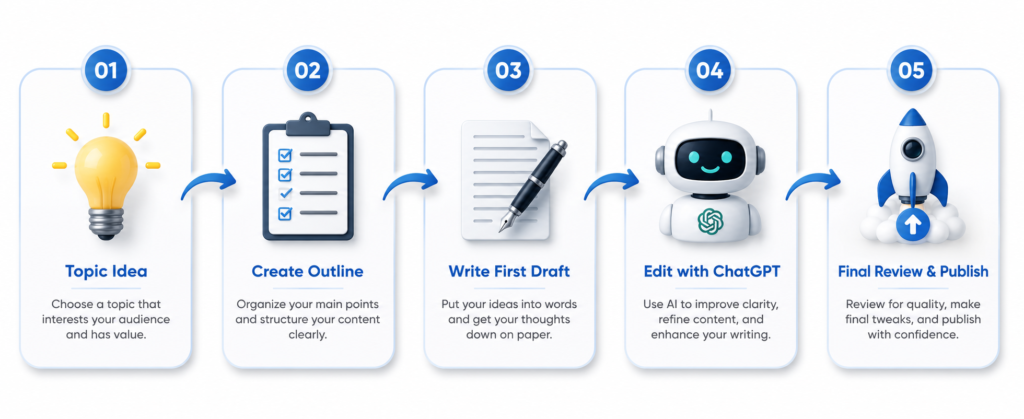
Use ChatGPT for structure, not soul. Here’s my workflow:
- Brainstorm angles. Ask ChatGPT: “Give me 5 different angles for a blog post on [topic].”
- Build an outline. Pick the best angle and ask for a detailed outline with H2 and H3 headings.
- Write the draft yourself. Yes, actually write it. This is where your voice, anecdotes, and unique insights belong.
- Use AI for editing. Once your draft is done, feed it back to ChatGPT and ask: “Where are the clarity issues? What questions might a reader still have?”
The skeleton comes from AI. The heartbeat comes from you.
Step 3: Inject Personal Stories and Real Experience
AI can’t tell stories from its own life. But you can.
Why This Matters (Especially for Google)
Google’s E-E-A-T guidelines-Experience, Expertise, Authoritativeness, and Trustworthiness-explicitly reward content that shows firsthand involvement. In fact, Google added the second “E” (Experience) in late 2022 specifically to counterbalance AI-generated content. The logic is simple: AI can synthesize information at scale, but it cannot produce genuine experience.
When you add personal stories, you’re not just being engaging-you’re building trust signals that algorithms and readers alike can recognize.
Before and After
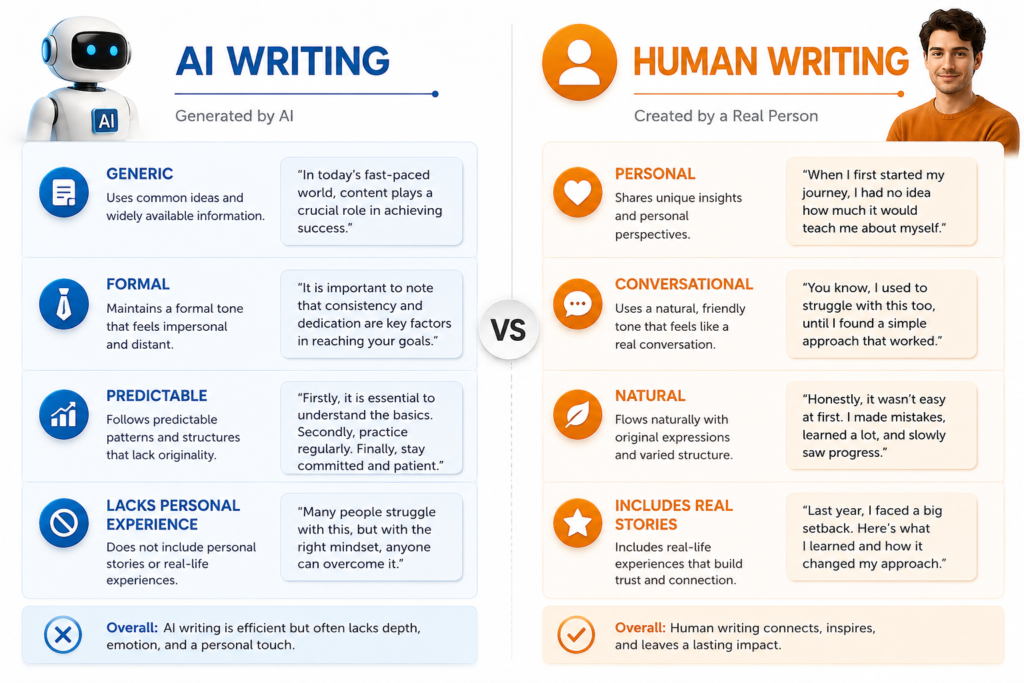
Robotic (AI-generated):
“Networking is essential for business growth. It helps you build relationships and discover new opportunities.”
Human (with experience):
“I landed my biggest client through a conversation at an airport café. We weren’t even talking about work-just swapping travel stories. That unexpected connection taught me that networking isn’t about handing out business cards. It’s about being genuinely interested in people.”
See the difference? The second version is memorable. It builds trust. It feels real.
Step 4: Break the AI Patterns
AI writing has fingerprints. Here’s how to remove them.
Use Contractions
ChatGPT almost always writes out full words. Change them:
- “it is” → “it’s”
- “you are” → “you’re”
- “do not” → “don’t”
Small change, huge difference.
Simplify Vocabulary
Replace formal words with everyday ones :
- “utilize” → “use”
- “leverage” → “use”
- “ascertain” → “find out”
- “myriad” → “many”
Vary Sentence Length
AI often writes sentences that are all the same length. Mix it up. Short sentences create impact. Longer ones add depth. The rhythm should feel natural.
Break Some Grammar Rules
Formal writing has rules. Human conversation doesn’t.
Start a sentence with “And.” Use a sentence fragment. For emphasis. Like this. It makes your writing feel dynamic and real.
Step 5: Edit Like a Human (Not a Bot)
Even with the best prompts, final editing is non-negotiable.
The “Read It Aloud” Test
If you read your text aloud and it sounds stiff, it will sound stiff to your readers. Read every draft out loud. If you wouldn’t say it that way in real life, rewrite it.
Rewrite at Least 30%
A good rule of thumb: rewrite at least 30% of what ChatGPT gives you. Add personality, humour, cultural references, and your own observations.
Add Unique Details
Replace generic advice with specific, practical examples. Instead of “content creation requires strategic planning,” try:
“You’re staring at your screen for 20 minutes before posting. That’s not writer’s block. That’s unclear messaging.”
A Complete Before-and-After Example
Original ChatGPT Text:
“To achieve optimal results in digital marketing, it is imperative to utilize a multi-faceted strategy. One should leverage social media platforms for engagement, employ search engine optimization for visibility, and ascertain the target demographic through comprehensive market research. This approach will ensure a robust online presence.”
Humanized Version:
“How do you actually get results with digital marketing? I’ve learned the hard way that you can’t just throw everything at the wall and hope something sticks.
For me, it boils down to three things: using social media to actually talk to people, making sure they can find me on Google (that’s SEO), and most importantly-actually knowing who I’m talking to. It sounds simple, but it’s amazing how many people skip that last part. Get those three things right, and you’ll build an online presence that lasts.”
Step 6: Build Trust and Authority (E-E-A-T)
Google’s new policies demand that content demonstrate genuine trustworthiness. Here’s how to meet that standard :
Cite Your Sources
Link to authoritative, relevant sources. Use primary research and official documentation where possible.
Show Your Credentials
Add an author bio that includes years of experience, relevant qualifications, and links to verified professional profiles.
Be Transparent
If you use AI assistance, it’s okay to disclose it. Google’s Quality Rater Guidelines specifically assess whether content appears AI-generated, but they don’t penalize AI content that demonstrates genuine E-E-A-T and human oversight.
Include Original Media
Use real screenshots, process diagrams, or original photos. AI can’t create these, and they’re powerful experience signals.
Update Regularly
AI content can become outdated quickly. Refresh your articles every 3–6 months to maintain accuracy and relevance.
Conclusion: AI Is Your Assistant, Not Your Ghostwriter
Here’s what I’ve learned after years of writing with and without AI:
The tools change. The algorithms change. But the fundamental need for genuine, useful, human-centered content does not.
If you’re wondering how to use ChatGPT for blog writing, treat it as your assistant rather than your ghostwriter. It can handle research, structure, and editing. It can help you break through writer’s block. But it can’t tell your stories, share your perspective, or build the kind of trust that turns readers into loyal fans.
Start small. Pick one article. Use AI for the outline and editing-but write the draft yourself. Read it aloud. Add a personal story. Make it sound like you.
Your voice is your competitive advantage. Don’t let anyone-or any algorithm-convince you otherwise.