Managing content, tasks, research, and business projects can quickly become complicated. One document sits in a folder, another lives in a separate writing app, and important project details disappear inside old messages.
Notion aims to bring that work together in one workspace. Its AI features add another layer: users can ask questions about their workspace, generate or improve documents, organize information, and automate certain repetitive tasks.
But does Notion AI actually make everyday work easier, or is it another subscription that sounds more useful than it feels?
This review examines what Notion AI offers, where it can save time, its limitations, and the type of user who may benefit from it. It is based on publicly documented features and pricing, not a claim of hands-on testing.
What Is Notion AI?
Notion AI is an AI assistant integrated into Notion, a productivity and workspace application.
Rather than functioning only as a separate chatbot, it can work with information stored in your Notion pages, documents, and databases. Depending on your plan and enabled connections, it can also use information from connected applications.
Its capabilities include:
- Drafting and editing documents.
- Summarizing existing information.
- Finding answers within a workspace.
- Helping create and organize databases.
- Transcribing and summarizing meetings.
- Supporting research and certain multi-step tasks.
The main idea is straightforward: keep your information and AI-assisted work in the same environment.
For someone who already uses Notion to manage projects, this integration may be more valuable than having another standalone AI writing tool.
Notion AI Features That Matter in Everyday Work
1. AI writing and editing
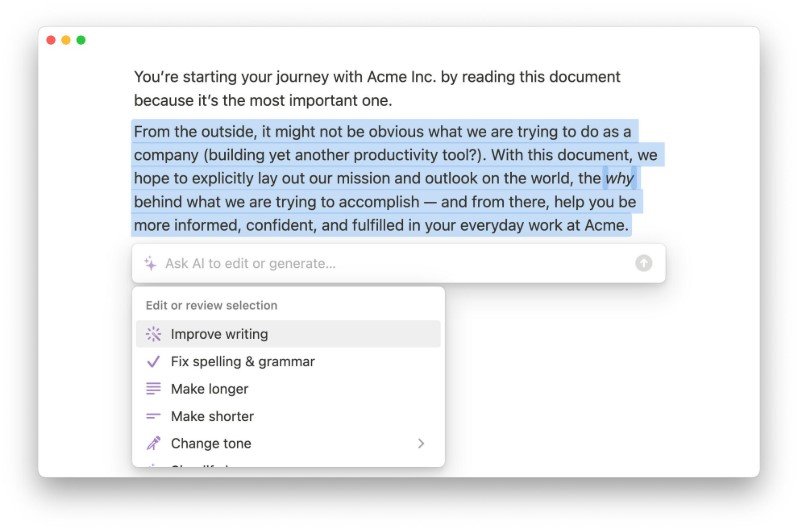
Notion AI can help users create drafts, revise paragraphs, improve clarity, summarize content, and change the tone of existing writing.
For example, a freelancer could use it to turn rough project notes into a structured proposal. A business owner might use it to prepare an initial outline for a product announcement.
However, generated text still needs review. AI can introduce inaccurate details, generic wording, or claims that are not supported by the original notes.
For professional publishing, use AI as an editing and drafting assistant-not as a replacement for fact-checking, original experience, or editorial judgment.
2. Notion Agent
Notion Agent can handle more involved tasks using information available in your workspace and connected apps.
Instead of asking for a single paragraph, a user may request help organizing project information, creating pages, or working through a multi-step assignment.
The practical benefit is that the assistant can work with existing context rather than requiring you to copy every relevant note into a separate chat.
Its usefulness still depends on the quality of your workspace, the information it can access, and the permissions available to it.
3. AI search across information
Notion AI can help locate information across your workspace and, when configured, connected services.
Imagine preparing a client update. Instead of manually opening several project pages, you could ask the assistant to find the latest decisions and summarize them.
This can reduce the effort involved in searching through scattered information. It does not guarantee that every result is complete or that the assistant will always interpret the source correctly.
Check important answers against the original documents.
4. Meeting notes and summaries
Notion AI includes meeting-note capabilities that can transcribe conversations, summarize discussions, and identify useful follow-up information.
This can help teams turn a meeting into a searchable record rather than leaving decisions buried in handwritten notes.
Before recording or transcribing a meeting, make sure participants understand the process and that it complies with relevant privacy and workplace requirements.
5. AI-assisted databases and research
Notion AI can help create databases, populate certain properties, work with information, and assist with research.
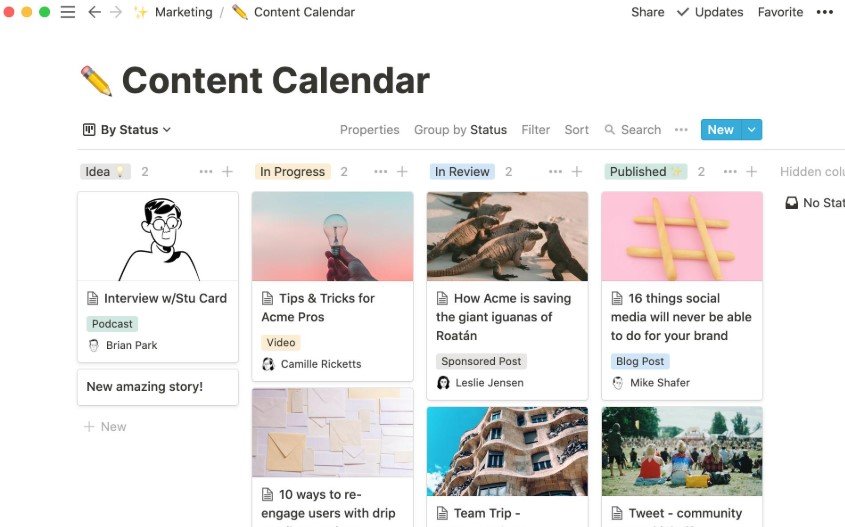
For example, a content team could maintain a database containing article ideas, assigned writers, publishing dates, and editorial status.
AI may help organize or summarize information, but it cannot automatically guarantee that a research result is accurate, comprehensive, or ready for publication.
Notion AI Pricing: What Should You Know?
Notion offers several workspace plans. The AI features available to you depend on the plan, feature, and applicable usage limits.
According to Notion’s published pricing information:
| Plan | Published price | AI access |
|---|---|---|
| Free | $0 | Limited AI trial capabilities |
| Plus | $10 per member/month | Limited AI trial capabilities |
| Business | $20 per member/month | Includes Notion AI features |
| Enterprise | Custom pricing | AI features with additional organizational controls |
These are published US dollar prices. Billing, taxes, promotions, and regional availability may differ. Confirm the current plan details on Notion’s official pricing page before subscribing.
A further consideration is that certain custom agents use a separate credit system. Teams planning to automate recurring work should understand the associated usage costs before depending on those workflows.
The important distinction: paying for a general Notion workspace plan does not necessarily mean every AI feature is unlimited or included.
Pros and Cons of Notion AI
Advantages
Works inside your existing workspace. You can use AI alongside the documents, tasks, and databases you already maintain.
Useful for organizing information. Summaries, workspace search, and database assistance can reduce repetitive administrative work.
Supports more than writing. Its value extends to project management, meeting notes, research, and information retrieval.
Can help teams maintain shared context. When workspace information is organized and permissions are configured correctly, AI assistance can become part of a collaborative workflow.
Limitations
Not everyone needs another AI subscription. If your primary goal is simply to generate occasional paragraphs, a dedicated writing assistant or a general-purpose chatbot may be sufficient.
Output requires verification. AI-generated text, summaries, and research can contain mistakes or omit important context.
Advanced features depend on the plan. Users should check which capabilities are included and whether usage limits or credits apply.
The workspace needs good organization. Poorly maintained documents and databases can make AI-assisted retrieval less useful.
Privacy needs attention. Before connecting business information or confidential documents, review the product’s current privacy terms, workspace permissions, and data-handling settings.
Notion AI vs. a Standalone AI Chatbot
Notion AI and standalone chatbots solve overlapping but different problems.
A standalone chatbot is often convenient for answering general questions, exploring ideas, and generating content without first building a workspace.
Notion AI becomes more compelling when the task depends on information already stored in Notion or when the result needs to become part of a document, database, or project.
Consider these examples:
| Task | Potentially better fit |
|---|---|
| Brainstorming a topic from scratch | A general-purpose AI chatbot |
| Summarizing project notes stored in Notion | Notion AI |
| Organizing a content calendar | Notion’s workspace and database tools |
| Producing a quick standalone draft | A chatbot or writing assistant |
| Finding information across a connected workspace | Notion AI, if the relevant sources are connected |
The best choice depends on where your information lives and what you want to accomplish.
Who Should Use Notion AI?
Content creators and freelancers
Notion AI may help manage article outlines, briefs, client notes, editorial calendars, and project documents.
It is most useful when these materials already live in Notion, and the creator needs help organizing or working with them.
Small businesses
Small teams can use Notion to maintain project records, internal documentation, task databases, and meeting notes.
AI assistance may help employees locate information and prepare routine documents. Teams should still establish clear access permissions and review important outputs.
Students
Students may find Notion useful for organizing notes, planning assignments, and summarizing their own study material.
AI-generated explanations should be checked against course materials, and students should follow their institution’s rules for AI assistance.
Users who may not need it
If you only want an AI tool to answer occasional questions or rewrite short paragraphs, Notion AI may add unnecessary complexity.
You may be better served by an existing chatbot or a simpler writing tool.
How to Get More Value from Notion AI
If you decide to try Notion AI, start with one real workflow instead of building an elaborate system immediately.
- Create a workspace page for a project you already manage.
- Add your existing notes, tasks, and relevant documents.
- Ask AI to summarize the material or identify missing information.
- Check the response against the original sources.
- Use the result to improve your workflow, and assess whether the time saved justifies the cost.
For a content team, a small editorial database is a useful starting point. Track the topic, target keyword, article status, editor, and planned publication date.
Test the AI features against real work before upgrading your subscription.
Final Verdict: Is Notion AI Worth It?
Notion AI is worth considering if you already use Notion as a central workspace and regularly need help working with the information stored there.
Its strongest advantage is integration: writing assistance, search, summaries, and certain task-oriented AI features can operate alongside your existing documents and projects.
That does not make it the best AI tool for every user. A standalone chatbot may be simpler for occasional questions, while a dedicated writing application may be more appropriate for a narrow editing workflow.
Our recommendation: start with the features available in your current Notion plan, test them against a genuine work task, and upgrade only if the additional capabilities solve a problem you actually have.
A productivity tool should make your work easier-not create another system you have to maintain.
Frequently Asked Questions
Is Notion AI free?
Notion’s Free and Plus plans offer limited AI trial capabilities. Access to more extensive AI features depends on the plan and applicable usage rules. Check the current pricing page for details.
Can Notion AI write articles?
It can help draft, edit, summarize, and organize writing. A publishable article still needs human review, fact-checking, originality, and editorial refinement.
Is Notion AI better than ChatGPT?
Neither is universally better. Notion AI has an advantage when you want assistance inside your Notion workspace. A standalone chatbot may be more convenient for general-purpose conversations and tasks that do not depend on workspace information.
Does Notion AI work with databases?
Yes. Its documented capabilities include helping create databases and populate certain database properties. The available functionality depends on your plan and workspace setup.
Is Notion AI suitable for businesses?
It can be useful for documentation, project coordination, research, and meeting summaries. Businesses should assess permissions, data handling, subscription costs, and the accuracy of AI outputs before adopting it for sensitive or important work.
Should a beginner pay for Notion AI?
Not necessarily. Begin with the free workspace and trial capabilities, learn how Notion fits your workflow, and upgrade only when you can identify a specific feature that justifies the expense.
Editorial note: This review describes publicly documented product capabilities and published plan information. It is not a claim that ComplexBizz independently tested every feature. Verify current pricing and availability before you decide to purchase.